Finding Datasets
Locate datasets matching your search criteria using text queries and filters
Discover datasets by searching with natural language, keywords, or structured filters.
When to use this guide
Use this guide when you need to:
- Locate datasets about a specific topic
- Filter by theme, format, or publisher
- Refine broad search results
Prerequisites
- data.gv.at MCP Server connected in Claude Desktop
- Understanding of your search requirements (topic, format preferences)
Quick search
Ask Claude in natural language:
Find datasets about Vienna populationClaude uses semantic search automatically and shows relevant datasets.
Good for:
- Exploratory searches
- Natural language queries
- Quick discovery
Filtered search
Ask Claude with requirements
Tell Claude your filters in natural language:
Find CSV datasets about health from ViennaClaude uses semantic_search_datasets or search_datasets automatically.
Try it:
- "Show me environment datasets"
- "Find recent population data in JSON format"
- "Search for social datasets from Austrian government"
Direct API call with faceted filters
search_datasets(
    query="bevölkerung",
    themes=["SOCI"],
    formats=["CSV", "JSON"],
    publishers=["stadt-wien"],
    min_date="2024-01-01",
    boost_quality=True,
    sort_by="modified_desc",
    limit=50
)
Parameters:
Prop
Type
Returns:
{
  "results": [
    {
      "id": "bev-stat-wien-2024",
      "title": "Bevölkerung Wien 2020-2024",
      "description": "Quarterly population statistics by district...",
      "quality_score": 87
    }
  ],
  "count": 42,
  "facets": {
    "themes": {"SOCI": 30, "HEAL": 12},
    "formats": {"CSV": 25, "JSON": 17}
  }
}
Error handling:
try:
    results = search_datasets(query="bevölkerung")
except ToolError as e:
    print(f"Search failed: {e}")
    # API may be temporarily unavailable
Semantic search for natural queries
Semantic search understands the meaning behind your query, not just keywords. It finds conceptually related datasets even when they don't contain exact search terms.
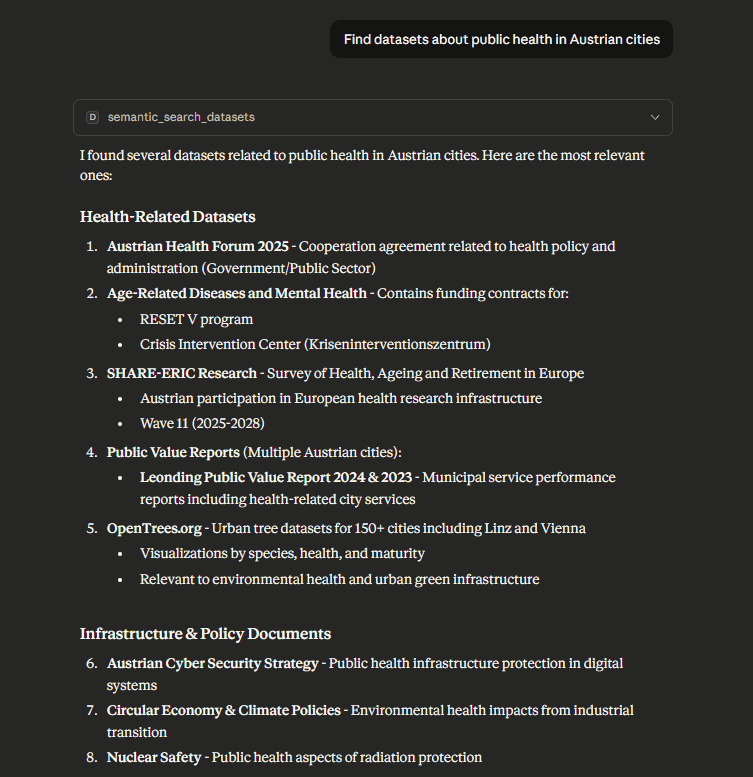
Visual example: Semantic search in action
The following screenshot demonstrates how semantic search expands natural language queries to find relevant datasets:
Semantic Search
This is a placeholder image. Real Claude Desktop screenshots showing data.gv.at MCP Server semantic search with query expansion will be added soon. The screenshot will demonstrate actual language detection, theme expansion, and conceptually relevant results.
Key features of semantic search shown:
- Language detection: Automatically identifies query language (English/German)
- Theme expansion: Maps natural query to EU themes (HEAL, SOCI, REGI)
- Conceptual matching: Finds datasets about the topic even without exact keyword matches
- Quality indicators: Shows metadata completeness scores for each result
Natural language queries
Use complete questions or descriptions:
Find datasets about Vienna's air quality monitoring stationsClaude automatically expands query with synonyms and related themes.
When to use semantic search:
- You have a question in natural language
- You want related datasets (not exact keyword matches)
- You need multi-language support (German/English)
Direct semantic search call
semantic_search_datasets(
    natural_query="Luftqualität Wien Messstationen",
    formats=["CSV"],
    boost_quality=True
)
What happens:
- Language detection (German vs English)
- Query expansion via LLM (adds synonyms, related themes)
- Standard search with expanded terms
- Quality boost applied if enabled
Response includes expansion info:
{
  "results": [...],
  "count": 15,
  "expansion_info": {
    "detected_language": "de",
    "semantic_themes": ["ENVI"],
    "confidence": 0.85
  }
}
Error handling:
If semantic expansion fails, falls back to original query:
{
  "results": [...],
  "expansion_info": {
    "fallback": true,
    "reason": "Low confidence expansion"
  }
}
Theme-based filtering
Filter by topic area
Tell Claude which themes you need:
Find datasets about health and social topicsClaude maps topics to EU DCAT-AP theme codes automatically.
Direct theme filtering
Use EU DCAT-AP theme codes:
search_datasets(
    themes=["HEAL", "SOCI"],
    limit=50
)
Available themes:
- AGRI: Agriculture, fisheries, forestry
- ECON: Economy and finance
- EDUC: Education, culture, sport
- ENER: Energy
- ENVI: Environment
- GOVE: Government and public sector
- HEAL: Health
- INTR: International issues
- JUST: Justice, legal system, public safety
- REGI: Regions and cities
- SOCI: Population and society
- TECH: Science and technology
- TRAN: Transport
Filtering logic:
- Multiple themes: OR within same facet (HEAL OR SOCI)
- Combine with other filters: AND between facets (themes AND formats)
Troubleshooting
Search returns no results
Symptom: Count is 0, no datasets found
Causes:
- Query too specific
- Filters too restrictive
- Spelling errors in query
Solutions:
- Try broader query terms
- Remove format/publisher filters
- Check theme codes (must be uppercase: SOCI not soci)
- Use
semantic_search_datasetsfor query expansion
Semantic search returns irrelevant results
Symptom: Results don't match query intent
Cause: Language detection incorrect or semantic expansion too broad
Solutions:
- Check
expansion_info.detected_languagein response - If wrong language, use direct
search_datasets()instead - Add explicit theme filters to constrain expansion
- Use more specific query terms
Quality boost returns no results
Symptom: Search with boost_quality=True returns empty
Cause: Quality filter too strict for domain
Solutions:
- Try search without
boost_qualityfirst - Review quality scores of all results
- Lower quality threshold expectations for niche domains
Facets show unexpected counts
Symptom: Facet counts don't match expected distribution
Cause: Multiple filters applied, counts reflect intersections
Solutions:
- Remove filters to see full facet distribution
- Check if datasets have multiple themes (counted in each)
- Review filtered vs unfiltered search results
Next steps
- Quality Metrics Guide - Understand quality scoring
- Data Preview Guide - Inspect data before downloading
- API Reference - Complete tool documentation
How is this guide?
Last updated on